- Core Concepts
- 1. Initial Setup
- 3. Trackpad
- 4. Keyboard
- 6. CPU Detailing
- 7. CPU Case Fillets
- 2. CPU Case
- 5. Speakers
- 9. Display Case 3D Geometry
- 8. Display Case 2D Geometry
- 10. Positioning the Display Case
- 12. Rotating the Display Case
- 13. Creating the Hinge
- 11. Display Case Fillet
- 15. Keys 3D Geometry
- 14. Keys 2D Geometry
- 17. Viewports
- 16. Speaker Detailing
- Architect 2013: 1. File and Document Setup
- Architect 2013: 3. Creating the Roofs
- Architect 2013: 4. Creating the Roof Flashing Cap
- Architect 2013: 5. Creating the Floors
- Architect 2013: 7. Inserting Doors
- Architect 2013: 6. Drawing the Concrete Pads
- Architect 2013: 9. Creating the Building Entrances
- Architect 2013: 2. Drawing the Walls
- Architect 2013:11. Presenting and Annotating the Final Model
- Architect 2013: 8. Inserting Windows
- Architect 2013: 10. Adding Stairs and Handrails
- Landmark 2013: 3. Set up the Drawing Area
- Landmark 2013: 4. Importing DWGs
- Landmark 2013: 5. Drawing Up the Site
- Landmark 2013: 2. Access Landmark Resources
- Landmark 2013: 7. Existing Trees
- Landmark 2013: 8. Setting the Sun Position
- Landmark 2013: 9. Explore Example File
- Landmark 2013: 10. Create Hard Landscaping Areas
- Landmark 2013: 11. Create a Hardscape Report
- Landmark 2013: 12. Create Steps
- Landmark 2013: 1. Navigate the Landmark Workspace
- Landmark 2013: 13. Draw Walls
- Landmark 2013: 14. Stepping Stones
- Landmark 2013: 6. Drawing a Building
- Landmark 2013: 15. Add Benches and Loungers
- Landmark 2013: 18. Explore Planting File and Plant Graphics
- Landmark 2013: 19. Placing Plants
- Landmark 2013: 20. Define a New Plant
- Landmark 2013: 21. Create a Landscape Area
- Landmark 2013: 17. Add Dimensions to the Structure
- Landmark 2013: 23. Create Sheet Layers
- Landmark 2013: 24. Create a Plan Viewport
- Landmark 2013: 16. Draw Pillars and Roof Structure
- Landmark 2013: 22. Create a Plant Report
- Landmark 2013: 25. Create a 3D Rendered View
- Landmark 2013: 26. Create Additional Viewports
- Landmark 2013: 27. PDFs and Printing
- Spotlight 2013: 1. Document Setup
- Spotlight 2013: 4. Seating
- Spotlight 2013: 3. Soft Goods
- Spotlight 2013: 2. Theatre Architecture
- Spotlight 2013: 6. Drawing a Light Plot
- Spotlight 2013: 7. Presenting Your Drawing
- Spotlight 2013: 5. Scenery
- Spotlight 2013: 9. Custom Lighting Instrument
- Spotlight 2013: 8. Event Planning
- Renderworks 2013: 1. Place Renderworks Cameras
- Renderworks 2013: 2. Exterior Lighting and Renderworks Style
- Renderworks 2013: 5. Mapping Textures
- Renderworks 2013: 3. Image Based Textures
- Renderworks 2013: 4. Procedural Glass Texture
- Renderworks 2013: 6. Creating Image Props
- Renderworks 2013: 9. Interior Day Lighting
- Renderworks 2013: 8. Interior Night Lighting
- Renderworks 2013: 7. Export Image
想玩转建筑设计?这份Vectorworks 2013官方入门指南就是你的敲门砖
作为一个专注设计软件教学6年的老司机,今天必须给你安利这款被全球设计师疯狂打call的神器。Vectorworks 2013可不是普通的建模软件,它能让你从画平面图到做逼真渲染一气呵成!

为什么设计师都在偷偷学这个?
Vectorworks来自德国Nemetschek集团,在欧美日韩绝对是建筑事务所的标配。最新2013版有80多项升级,特别是那个能自动适应日照的物理天空渲染,做建筑表现图简直开挂!
我带过的学生里,有人用它两周就做出了带动态阴影的剧场灯光方案,还有学姐用它搞定了故宫角楼的三维测绘作业。关键是它的操作逻辑特别友好,用过PS的人半小时就能上手基础操作。
这个课到底能学到啥?
专门给新手准备的12章保姆级教程,从安装软件到做出第一个商业项目全流程覆盖。特别要夸爆第三章的曲面阵列功能教学,当年我学这个技巧帮客户做流线型屋顶,直接省了三天建模时间!
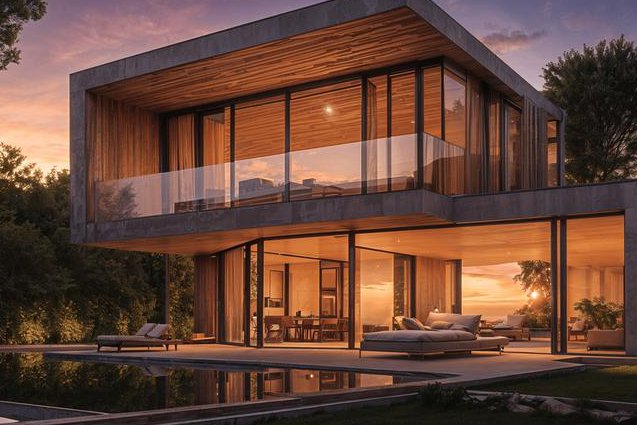
课程硬核内容预览
- Day1-3:解密软件界面/秒懂核心工具组/精确绘图技巧
- Day4-6:从二维平面到三维立体的魔法变身/墙体智能生成
- Day7-9:曲面阵列高阶玩法/体育场异形结构实战
- Day10-12:Renderworks电影级渲染/施工图自动标注
哪些人特别需要这门课?
去年有个做展览设计的学员,学完就能独立完成整个展台建模+灯光模拟。如果你也是以下人群,闭眼入就对了:
- 建筑/景观专业在校生(作业神器)
- 刚入职的设计助理(效率碾压同事)
- 自由设计师(接单报价提升30%)
- 舞台美术工作者(灯光效果预览超精准)
别人不会告诉你的隐藏福利
课程包内含2013版独家汉化补丁,还有我整理的28种材质参数预设库。最值钱的是附带GB/JIS两种施工图标注模板,国内做项目报审直接就能用!
现在很多高校像央美、国美都在用Vectorworks替代传统CAD教学,早点掌握这个技能,无论是找工作还是考研作品集都是加分项。记住,设计工具决定你的职场天花板高度。
下次再看到同事用笨方法建模时,你就可以淡淡地说:"试试按住Alt键拖拽曲面阵列?" 深藏功与名~